
WebSync update: more destinations, Sheets, and a free YouTube trick
Hello friend!
A short update on what’s landed since I last wrote.
New popup:
The WebSync popup has a fresh new look — cleaner, easier to use, and more polished. It’s also destination-first now: open WebSync, choose where you want the capture to go, then run.
You can still send pages and YouTube videos into Gemini Notebook, but you can now also send captures to Google Drive, the clipboard, downloads, and Google Sheets — especially useful for structured data like product lists and directories.
Something free to try:
Open any single YouTube video → WebSync → Clipboard →Copy Transcript.
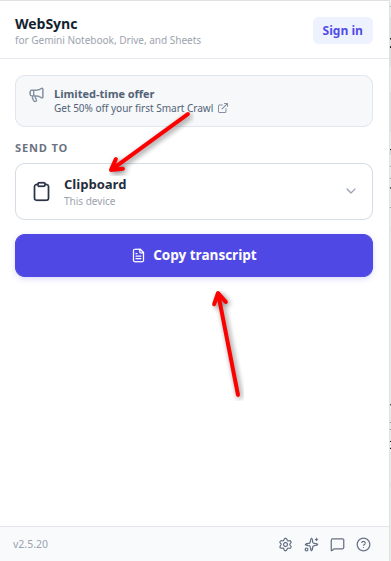
WebSync will copy the transcript straight to your clipboard — handy when you want to use it in Claude, Cursor, Notes, a document, or anywhere else.
Playlists, search results, and bulk transcripts are also supported on paid plans. Learn more.
Something more advanced:
Want to see Google Sheets in action? Here’s a worked example that turns Amazon search results into a comparison spreadsheet:
Amazon product research use case
If there’s a website you need to extract data from, WebSync can create a customized Smart Crawl for it. You can set one up through WebSync, or just reply with the website and what you want captured, and I’ll help you figure it out.
Thanks for being part of the WebSync journey.
— Dan
P.S. If WebSync has been useful, a quick rating on the Chrome Web Store helps a lot.